
How to Measure SEO in Google Analytics: 21 Powerful & Proven Ways for Positive Growth
Search Engine Optimization (SEO) is not just about rankings—it’s about measurable growth. If you don’t track and analyze your SEO performance properly, you’re essentially guessing. That’s why understanding how to measure SEO in Google Analytics is one of the most powerful skills for marketers, bloggers, and business owners.
In this in-depth guide, you’ll learn how to measure SEO in Google Analytics step by step, using practical metrics, reports, and strategies that actually matter. By the end of this article, you’ll be able to confidently evaluate your organic search performance, identify growth opportunities, and make data-driven SEO decisions.
Why Learning How to Measure SEO in Google Analytics Matters
Before diving into tools and metrics, it’s important to understand why knowing how to measure SEO in Google Analytics is essential.
SEO is a long-term investment. Results don’t always appear instantly, and rankings alone don’t tell the full story. Google Analytics helps you understand:
- How much organic traffic you’re getting
- Which pages are driving SEO success
- How users behave after arriving from search engines
- Whether SEO traffic converts into real business value
Without proper measurement, you cannot improve. That’s why mastering how to measure SEO in Google Analytics is critical for sustainable online growth.
Understanding Google Analytics for SEO Tracking
To fully grasp how to measure SEO in Google Analytics, you first need a clear understanding of what Google Analytics does—and what it doesn’t.
Google Analytics tracks user behavior after users land on your website. It doesn’t directly show keyword rankings (due to privacy reasons), but it provides powerful insights into traffic sources, engagement, and conversions.
Key strengths of Google Analytics for SEO include:
- Tracking organic search traffic
- Analyzing landing page performance
- Measuring engagement metrics
- Monitoring conversions from SEO
When combined with tools like Google Search Console, Google Analytics becomes an SEO measurement powerhouse.
Setting Up Google Analytics Correctly for SEO Measurement
Before learning how to measure SEO in Google Analytics, you must ensure your setup is accurate.
Use the Correct Property Type (GA4)
Google Analytics 4 (GA4) is now the standard. It focuses on events and user journeys rather than sessions alone. For SEO measurement, GA4 provides more flexible and future-proof tracking.
Connect Google Analytics with Google Search Console
This integration is essential if you want deeper SEO insights. It allows you to view search queries, impressions, and click data alongside user behavior metrics.
Ensure Proper Tracking Code Installation
If your tracking code is missing or incorrectly installed, your SEO data will be incomplete. Always verify tracking using real-time reports.
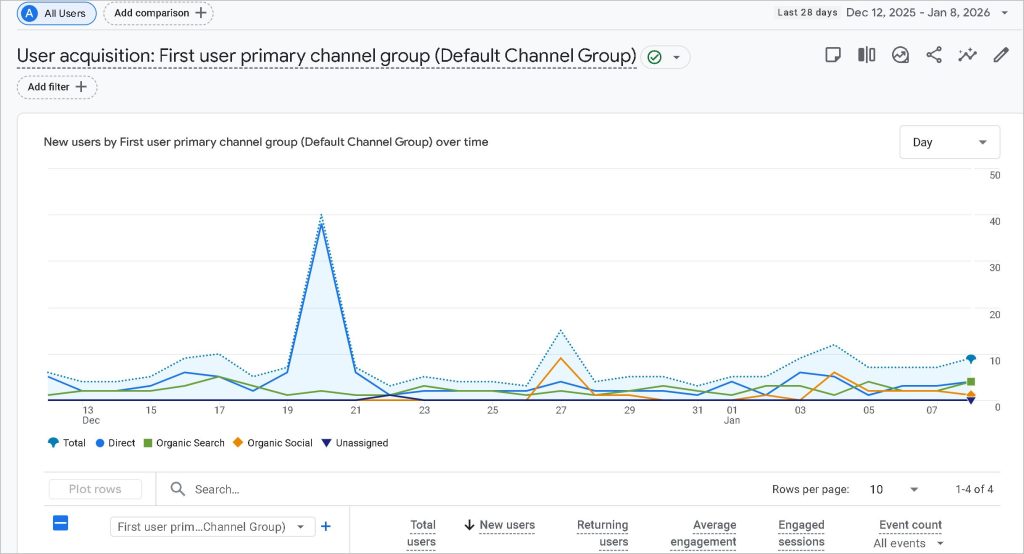
How to Measure SEO in Google Analytics Using Organic Traffic
The foundation of how to measure SEO in Google Analytics starts with organic traffic analysis.
Find Organic Traffic Data
Navigate to:
- Reports
- Acquisition
- Traffic Acquisition
- Filter by “Organic Search”
This shows how many users come from search engines like Google, Bing, or DuckDuckGo.
Analyze Organic Traffic Trends
When learning how to measure SEO in Google Analytics, always focus on trends, not just numbers.
Ask questions like:
- Is organic traffic growing month over month?
- Are there seasonal patterns?
- Did traffic drop after a Google update?
Consistent growth indicates effective SEO strategies.
Measuring SEO Performance Through Landing Pages
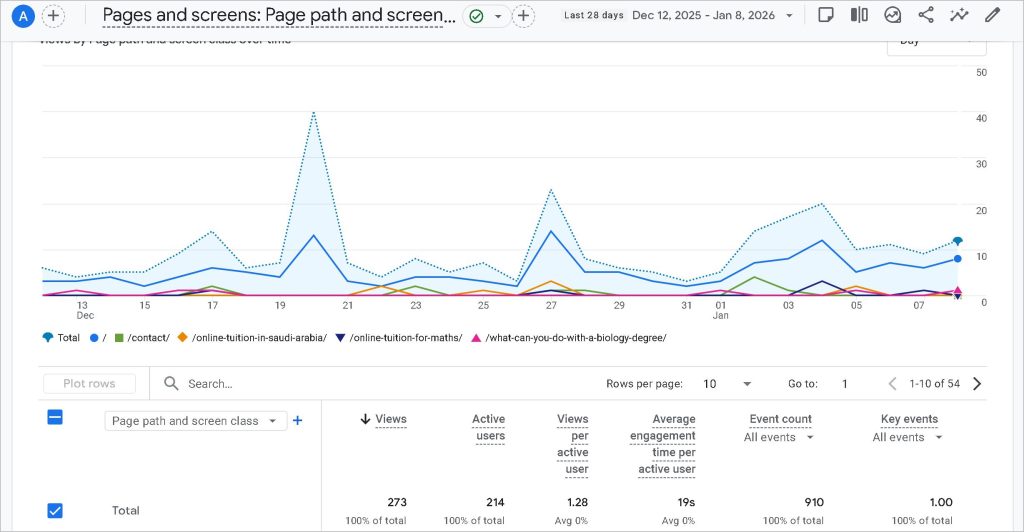
Landing pages are one of the most important elements when understanding how to measure SEO in Google Analytics.
Why Landing Pages Matter
SEO traffic usually enters your site through specific pages—not the homepage. These pages determine whether users stay, engage, or leave.
Key Landing Page Metrics to Analyze
When measuring SEO in Google Analytics, pay close attention to:
- Sessions from organic search
- Engagement rate
- Average engagement time
- Conversions
High-performing SEO landing pages typically have strong engagement and conversion metrics.

How to Measure SEO in Google Analytics Using Engagement Metrics
Engagement metrics reveal whether your SEO traffic is valuable.
Engagement Rate
In GA4, engagement rate replaces traditional bounce rate. It shows the percentage of sessions where users actively interact with your site.
A higher engagement rate suggests:
- Relevant content
- Good search intent matching
- Strong user experience
Average Engagement Time
This metric helps you understand content quality. If organic users spend more time on a page, it’s a strong signal of SEO success.
Understanding these metrics is a core part of how to measure SEO in Google Analytics effectively.
Measuring SEO Conversions in Google Analytics
Traffic alone doesn’t equal success. Real SEO measurement focuses on conversions.
What Is an SEO Conversion?
An SEO conversion is any valuable action completed by users who arrive via organic search, such as:
- Form submissions
- Purchases
- Newsletter signups
- Phone calls
Set Up Conversion Events in GA4
To measure SEO in Google Analytics properly, you must define conversion events.
Steps include:
- Identifying key user actions
- Marking relevant events as conversions
- Segmenting conversion data by traffic source
This allows you to see exactly how SEO contributes to business goals.
How to Measure SEO in Google Analytics with User Behavior Analysis
User behavior metrics help you evaluate content effectiveness.
Pages Per Session
This shows how many pages users visit after arriving from organic search. More pages usually indicate stronger interest and better internal linking.
Scroll Depth and Events
Custom events like scroll depth can help measure content engagement. If users scroll through most of your content, your SEO content strategy is working.
Understanding behavior patterns is essential when mastering how to measure SEO in Google Analytics.
Using Google Analytics Segments for SEO Analysis
Segments allow you to isolate organic traffic and analyze it deeply.
Create an Organic Traffic Segment
Filter users based on:
- Medium = organic
This helps you:
- Compare organic vs paid traffic
- Identify SEO-specific issues
- Optimize content for search users
Segmentation is one of the most powerful techniques in how to measure SEO in Google Analytics.
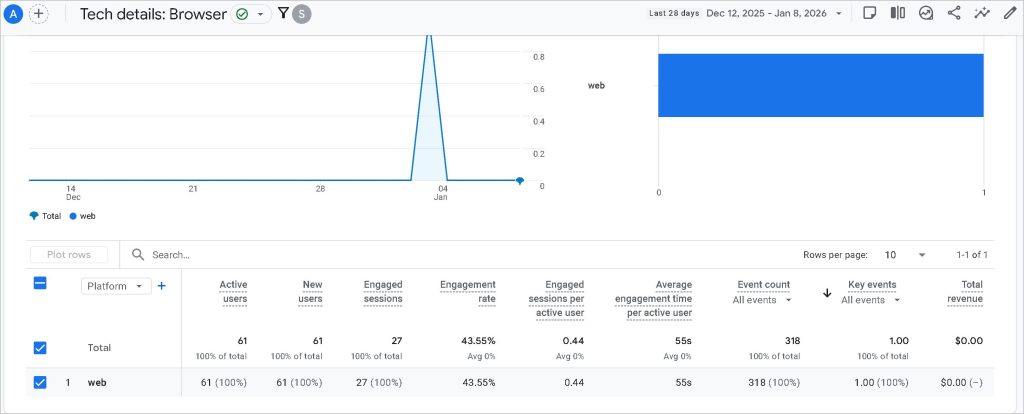
How to Measure SEO in Google Analytics by Device Performance
SEO performance varies by device.
Desktop vs Mobile SEO Performance
In Google Analytics, analyze organic traffic by:
- Device category
- Engagement metrics
- Conversion rates
If mobile SEO underperforms, it may indicate:
- Poor mobile UX
- Slow page speed
- Technical SEO issues
Device analysis plays a major role in how to measure SEO in Google Analytics accurately.
Measuring SEO Page Speed Impact in Google Analytics
Page speed affects rankings, engagement, and conversions.
Core Web Vitals and SEO
Although Core Web Vitals are tracked mainly in Search Console, Google Analytics helps you see the impact of speed on user behavior.
Identify Slow Pages with High Organic Traffic
Look for pages with:
- High organic sessions
- Low engagement
- High exit rates
Improving speed on these pages can dramatically improve SEO performance.
How to Measure SEO in Google Analytics Using Exit Pages
Exit pages reveal where users leave your site.
Why Exit Pages Matter for SEO
If users consistently exit from SEO landing pages, it may indicate:
- Content mismatch
- Poor UX
- Weak internal linking
Analyzing exit behavior helps refine your SEO strategy and is a critical aspect of how to measure SEO in Google Analytics.
Tracking SEO Content Performance Over Time
SEO is not static. Content performance changes over time.
Compare Date Ranges
Use date comparisons to analyze:
- Traffic growth
- Engagement changes
- Conversion improvements
This helps you understand whether your SEO efforts are delivering long-term value.
How to Measure SEO in Google Analytics with Assisted Conversions
SEO often supports conversions indirectly.
Assisted Conversion Tracking
Organic search may not always be the last interaction. Google Analytics allows you to see how SEO assists other channels.
This insight is essential when evaluating the true ROI of SEO.
Measuring SEO ROI in Google Analytics
Understanding how to measure SEO in Google Analytics also means understanding return on investment.
Calculate SEO Value
Use:
- Conversion value
- Cost savings compared to paid ads
- Lifetime value metrics
SEO ROI analysis helps justify long-term investment in organic growth.
How to Measure SEO in Google Analytics for Blog Content
Blogs are often SEO-driven.
Blog-Specific SEO Metrics
Analyze:
- Organic sessions per post
- Engagement time
- Internal link clicks
- Conversion paths
This helps you identify top-performing and underperforming SEO content.
Common Mistakes When Measuring SEO in Google Analytics
Even experienced marketers make mistakes.
Focusing Only on Traffic
Traffic without engagement or conversions is meaningless.
Ignoring Intent
Different keywords have different intent. Google Analytics helps you evaluate whether content meets user expectations.
Avoiding these mistakes improves how you measure SEO in Google Analytics.
Combining Google Analytics with Other SEO Tools
Google Analytics works best when paired with other platforms.
Google Search Console Integration
This combination provides:
- Keyword performance
- Click-through rates
- Impression data
Together, they give a complete picture of SEO performance.
Read More: How to Use Google Search Console to Improve SEO
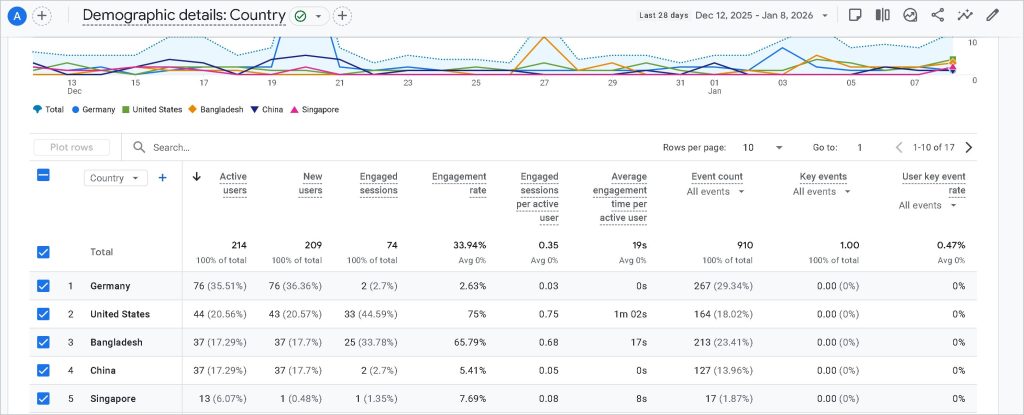
How to Measure SEO in Google Analytics for Local SEO
Local SEO requires specialized tracking.
Location-Based Organic Traffic
Analyze organic sessions by:
- Country
- City
- Region
This helps local businesses understand geographic SEO performance.
Building SEO Reports in Google Analytics
Reporting is essential for decision-making.
Custom SEO Dashboards
Create dashboards focused on:
- Organic traffic
- Engagement
- Conversions
Clear reporting makes how to measure SEO in Google Analytics easier for teams and clients.
How to Measure SEO in Google Analytics for E-commerce Sites
E-commerce SEO measurement focuses on revenue.
Key SEO Metrics for E-commerce
Track:
- Organic revenue
- Product page performance
- Conversion rate by landing page
This data shows exactly how SEO drives sales.
Future-Proofing Your SEO Measurement Strategy
SEO measurement evolves constantly.
Adapt to GA4 Updates
Stay updated with:
- New metrics
- Event-based tracking
- Privacy changes
A flexible approach ensures long-term success in how to measure SEO in Google Analytics.
Frequently Asked Questions (FAQ)
What is the best way to measure SEO in Google Analytics?
The best way to measure SEO in Google Analytics is by focusing on organic traffic, engagement metrics, landing page performance, and conversions rather than rankings alone.
Can Google Analytics show keyword data for SEO?
Google Analytics does not show most keyword data directly. However, integrating it with Google Search Console helps provide keyword insights alongside user behavior.
How long does it take to see SEO results in Google Analytics?
SEO results typically take weeks or months to appear. Google Analytics helps track gradual improvements in traffic, engagement, and conversions over time.
Is Google Analytics enough to measure SEO performance?
Google Analytics is essential but not enough alone. Combining it with tools like Google Search Console provides a more complete SEO measurement strategy.
How do I track SEO conversions in Google Analytics?
You can track SEO conversions by setting up conversion events in GA4 and segmenting them by organic traffic sources.
Final Thoughts on How to Measure SEO in Google Analytics
Understanding how to measure SEO in Google Analytics is not optional—it’s essential for sustainable digital growth. By focusing on organic traffic quality, engagement, conversions, and long-term trends, you can transform raw data into actionable SEO insights.
When used correctly, Google Analytics becomes more than a reporting tool—it becomes your SEO decision engine. Master these techniques, apply them consistently, and you’ll gain a clear competitive advantage in organic search performance.