
What Is AI Automation Software? 9 Essential Facts, Benefits, Types & Applications
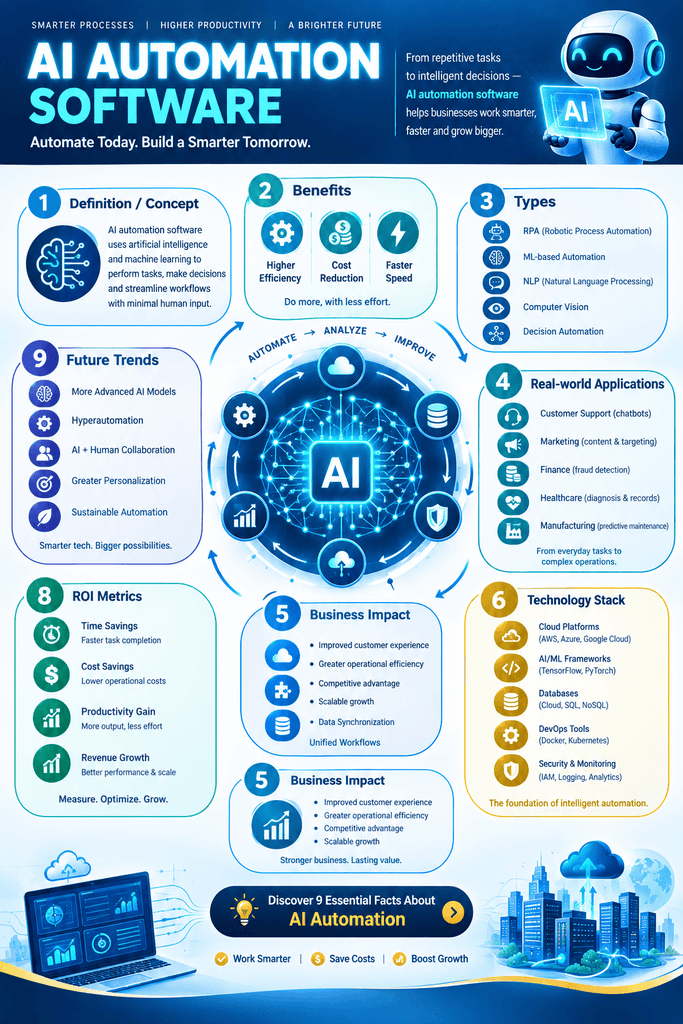
Artificial intelligence has changed the way businesses, organizations, and individuals handle repetitive and data-intensive tasks. Instead of relying entirely on manual work, modern systems can analyze information, recognize patterns, make decisions, communicate with users, and complete workflows automatically. One of the technologies driving this transformation is ai automation software.
But what exactly does this technology do? In simple terms, it combines artificial intelligence with automation to perform tasks that traditionally require human input. Traditional automation generally follows predefined rules, while AI-powered automation can analyze information, understand language, recognize patterns, and adapt its responses according to available data.
The technology is increasingly used in customer service, marketing, sales, finance, human resources, healthcare administration, information technology, e-commerce, and many other fields. Its purpose is not simply to make processes faster. It can also help organizations reduce repetitive workloads, improve consistency, process large amounts of information, and allow employees to focus on tasks that require creativity, judgment, and interpersonal skills.
This article explains what ai automation software is, how it works, its major features, types, benefits, applications, limitations, implementation process, and future potential.
What Is AI Automation Software?
Ai automation software refers to software that combines artificial intelligence technologies with automated workflows to perform tasks, analyze information, make predictions, or take actions with limited human intervention.
Traditional automation usually works according to explicit instructions. For example, a system might be programmed to send an email whenever a customer submits a form. AI-powered automation can go further. It may analyze the customer’s message, identify the topic, determine the customer’s likely intent, create an appropriate response, and route the request to the correct department.
The key difference is adaptability.
A conventional automated workflow may follow:
Input → Rule → Action
An AI-enhanced workflow can follow:
Input → AI analysis → Decision → Action → Feedback
This makes the technology useful for processes involving unstructured information, natural language, images, predictions, and complex decision-making.
For example, an online store can use an automated system to examine customer questions, identify frequently requested products, categorize support tickets, and recommend appropriate responses. A human employee can then review important or unusual cases.
Read More: What Is AI Automation? A Complete Guide to How It Works, Benefits, Types, and Applications.
How Does AI Automation Software Work?
The exact architecture differs between platforms, but most AI-driven automation systems contain several important components.
1. Data Input
The system first receives information from one or more sources. These sources may include websites, emails, forms, documents, databases, customer relationship management systems, spreadsheets, applications, or communication platforms.
For example, an organization might receive hundreds of customer emails every day. These messages become inputs for an automated workflow.
2. Data Processing
The system processes the information and prepares it for analysis. Depending on the application, this may involve extracting text, identifying relevant fields, removing unnecessary information, or organizing data.
Document-processing systems, for instance, can extract names, dates, invoice numbers, and payment amounts from digital documents.
3. Artificial Intelligence Analysis
The AI component examines the processed information. Different technologies can be used depending on the task.
Natural language processing can help systems understand written or spoken language. Machine learning can identify patterns in data. Computer vision can interpret images. Generative AI can create text, summaries, responses, or other content.
4. Decision or Prediction
After analyzing the information, the system determines what should happen next.
For example, it may classify an email as a sales inquiry, support request, billing issue, or general question.
5. Automated Action
The automation engine then performs an appropriate action. It may send a message, update a database, create a task, generate a report, notify an employee, or move information between applications.
6. Human Review
Some processes require human oversight. A well-designed system can send uncertain, sensitive, or high-risk cases to an employee rather than making an automatic decision.
7. Monitoring and Improvement
Organizations can monitor results and adjust workflows when necessary. Performance data can reveal errors, bottlenecks, or opportunities for improvement.
Read More: Zapier Updates News: 5 Latest Features, Improvements, and What They Mean for Users.
Key Features of AI Automation Software
Modern platforms can offer many capabilities. The exact features depend on the provider and use case, but several are common.
Natural Language Processing
Natural language processing enables systems to work with human language. It can help classify emails, summarize documents, extract information, answer questions, and generate responses.
For example, a support system can analyze a customer message and identify whether the customer is asking about delivery, payment, refunds, or product information.
Machine Learning
Machine learning allows systems to identify patterns from data. Instead of depending entirely on manually written rules, machine-learning models can use historical information to classify or predict outcomes.
This can be useful for demand forecasting, customer segmentation, anomaly detection, and recommendation systems.
Generative AI
Generative AI can produce new content based on instructions and available context. In automation workflows, it can draft emails, summarize meetings, create reports, transform documents, and generate responses.
Human review can remain important when generated content affects customers, finances, legal matters, or other sensitive areas.
Workflow Integration
Integration allows automation tools to communicate with other applications. A workflow might connect a website form to a CRM system, email platform, spreadsheet, project-management application, and notification service.
This reduces the need for employees to manually transfer information between systems.
Data Extraction
AI can extract structured information from unstructured sources such as documents, invoices, contracts, emails, and forms.
Instead of manually entering every field, employees can review extracted information and correct errors when necessary.
Analytics and Reporting
Automation platforms can collect information about workflow performance. Businesses can use these insights to determine how many tasks are completed automatically, where delays occur, and where human intervention is still required.
Read More: What Are the Best AI Workflow Automation Tools? Top Solutions for Smarter Business Processes.
Types of AI Automation Software
There is no single category that covers every use case. Different types are designed for different business and technical requirements.
1. Robotic Process Automation With AI
Robotic process automation, or RPA, traditionally uses software bots to perform repetitive digital actions. AI can make these systems more capable by helping them interpret documents, understand language, classify information, or make decisions.
For example, an RPA workflow can retrieve invoice information and an AI model can determine which fields contain the supplier name, invoice number, and total amount.
2. AI Customer Service Automation
These systems support customer-service operations through chatbots, automated email processing, ticket classification, knowledge retrieval, and response generation.
A customer might ask a question through a website. The system can understand the request, retrieve relevant information, and provide an answer. More complex issues can be transferred to a human representative.
3. AI Marketing Automation
Marketing teams can automate audience segmentation, content workflows, lead classification, campaign analysis, and personalized communication.
For example, a system can analyze customer behavior and categorize users according to interests or interactions.
4. AI Sales Automation
Sales automation can help teams organize leads, summarize customer interactions, identify follow-up opportunities, and update CRM records.
Instead of manually reviewing every interaction, sales representatives can receive structured summaries and suggested next actions.
5. AI Document Automation
Document automation focuses on extracting, classifying, summarizing, or processing information from documents.
This can be particularly useful for invoices, applications, forms, receipts, reports, and other repetitive paperwork.
6. AI Workflow Automation
General workflow platforms allow organizations to connect multiple applications and create automated processes.
For example:
Website Form → AI Classification → CRM Update → Sales Notification → Follow-Up Task
Such workflows can reduce manual data entry and improve the speed of information transfer.
7. AI IT Automation
IT departments can use AI-driven automation to monitor systems, classify support tickets, identify unusual activity, summarize incidents, and automate routine administrative tasks.
However, organizations should carefully control automated actions involving production systems, security, and critical infrastructure.
Read More: 7 Essential and Effective Insights on How Google Determines Search Relevance.
Benefits of AI Automation Software
When appropriately designed and supervised, ai automation software can provide several operational benefits.
Increased Productivity
Employees often spend substantial amounts of time performing repetitive activities such as copying information, sorting emails, preparing routine reports, and updating records.
Automating suitable tasks allows employees to devote more time to planning, problem-solving, communication, and creative work.
Reduced Repetitive Work
Repetitive work can contribute to employee fatigue and inconsistent performance. Automating routine processes can reduce the number of manual steps employees need to complete.
This does not mean every task should be automated. Human involvement remains important for activities requiring context, empathy, accountability, or complex judgment.
Faster Processing
Automated systems can operate continuously and process large volumes of information quickly.
For example, an organization receiving thousands of support requests can automatically classify incoming messages before assigning them to appropriate teams.
Improved Consistency
A well-designed workflow follows the same basic process each time. This can reduce variation caused by manual data entry or inconsistent procedures.
Consistency is particularly valuable when organizations have clearly defined business processes.
Better Data Organization
AI automation can help transform unstructured information into organized data. Emails, documents, forms, and customer messages can be classified and routed into appropriate systems.
Better organization can make information easier to search, analyze, and use.
Scalability
Manual processes often become difficult to manage as an organization grows. Automated workflows can handle increased volumes without requiring every additional task to be completed manually.
However, scalability depends on system architecture, data quality, infrastructure, and workflow design.
Potential Cost Savings
Automation may reduce operational costs by decreasing the amount of manual effort required for repetitive activities. The financial effect depends on implementation costs, workflow volume, maintenance requirements, and the value of employee time.
Read More: What Is SEO Rank Tracking? A Complete Guide to Measuring Search Performance.
Applications of AI Automation Software
The technology can be applied across many industries and departments.
Customer Support
Customer-service teams can use AI-powered workflows to classify tickets, answer common questions, summarize conversations, and route complex requests.
For example, a customer asking about an order can receive an automated response based on current order information, while a complaint requiring human attention can be transferred to a support specialist.
Human Resources
HR departments can automate administrative processes such as application sorting, interview scheduling, employee onboarding workflows, document organization, and routine communication.
Care is necessary when AI is involved in employment-related decisions because organizations must consider fairness, transparency, privacy, and applicable laws.
Finance and Accounting
Finance teams can automate invoice processing, expense categorization, document extraction, payment reminders, and reporting workflows.
AI can help extract information from invoices and identify unusual entries for human review.
Healthcare Administration
Healthcare organizations can use automation for scheduling, administrative documentation, information classification, and communication workflows.
Because healthcare information can be highly sensitive, systems should include strong privacy, security, access-control, and human-review mechanisms.
E-Commerce
Online retailers can automate customer support, product categorization, order notifications, recommendation workflows, inventory analysis, and marketing processes.
An AI system can analyze customer behavior and help personalize communication while automated workflows manage routine follow-up actions.
Education
Educational organizations can use AI automation for administrative communication, document processing, scheduling, student support, and content organization.
Teachers and administrators should retain appropriate oversight when systems affect student assessment or important educational decisions.
Real Estate
Real-estate businesses can automate lead management, appointment scheduling, inquiry classification, property data organization, and follow-up communications.
Manufacturing
Manufacturers can use AI-driven automation for predictive maintenance, quality inspection, production monitoring, demand forecasting, and anomaly detection.
Computer vision systems, for example, can inspect products for certain visual defects.
Read More: Do Google Reviews Help SEO? A Clear, Practical Guide to Rankings and Trust.
AI Automation Software vs. Traditional Automation
Although the two approaches overlap, they are not identical.
| Feature | Traditional Automation | AI-Powered Automation |
| Decision process | Mostly rule-based | Can use AI models and learned patterns |
| Structured data | Highly suitable | Suitable |
| Unstructured data | More difficult | Often more suitable |
| Natural language | Limited | Stronger capabilities |
| Adaptability | Usually limited | Can be more flexible |
| Content generation | Generally unavailable | Can generate content |
| Human oversight | Depends on workflow | Often important for complex decisions |
| Examples | Scheduled emails, fixed workflows | Document understanding, intelligent classification |
Traditional automation remains valuable. Organizations should not automatically replace simple rule-based workflows with AI. If a straightforward rule can reliably solve a problem, a conventional automated process may be more appropriate.
AI becomes particularly useful when the workflow involves ambiguity, language, images, predictions, or large amounts of unstructured information.
Read More: What Is Off-Page SEO? A Complete Guide to Building Authority and Trust.
How to Choose AI Automation Software
Choosing the right platform requires more than comparing feature lists. Organizations should first understand the process they want to improve.
Identify the Problem
Start with a specific workflow rather than choosing technology first.
Ask:
- What task takes too much time?
- How frequently is it performed?
- What information does the process use?
- Where do errors occur?
- What outcome should automation produce?
Evaluate Integration Options
The platform should work with the applications already used by the organization. Check whether it supports relevant APIs, databases, CRM platforms, communication tools, and file formats.
Examine AI Capabilities
Determine whether the platform provides the specific AI functionality required. A document-processing workflow may need optical character recognition and information extraction, while a customer-service workflow may require language understanding and retrieval capabilities.
Consider Security
Security should be a central consideration. Evaluate data encryption, access controls, authentication, audit logs, data retention policies, and vendor security practices.
Review Human Oversight
Determine when human approval should be required. High-impact decisions should generally have appropriate review mechanisms rather than being delegated blindly to automated systems.
Test Before Scaling
Begin with a limited pilot project. Measure accuracy, processing time, cost, error rates, and employee satisfaction before expanding the workflow.
Read More: What Is Local SEO? A Complete Guide to Boosting Your Local Visibility.
How to Implement AI Automation Successfully
Successful implementation usually requires a structured process.
Step 1: Map the Existing Workflow
Document every stage of the current process. Identify inputs, decisions, actions, systems, and human responsibilities.
Step 2: Select Suitable Tasks
Not every process needs AI. Prioritize repetitive, high-volume activities where automation can produce measurable benefits.
Step 3: Prepare the Data
Poor-quality data can reduce system performance. Clean, organize, and validate the information used by the workflow.
Step 4: Design the Workflow
Determine what the AI system should analyze, what decisions it should support, and what actions should happen afterward.
Step 5: Add Human Review
Create clear escalation procedures for uncertain, sensitive, or exceptional cases.
Step 6: Test the System
Run the workflow using representative examples. Measure accuracy and identify failure cases.
Step 7: Monitor Performance
After deployment, continuously monitor the system. AI models and business processes can change over time, so workflows may require updates.
Challenges and Limitations
Despite its potential, ai automation software is not a universal solution.
Data Quality Problems
AI systems depend heavily on the quality and relevance of their input data. Incomplete, outdated, inconsistent, or biased information can lead to unreliable results.
Implementation Costs
Some platforms require subscription fees, development work, integration costs, employee training, and ongoing maintenance.
Incorrect AI Outputs
AI systems can produce incorrect classifications, summaries, recommendations, or generated content. Automated workflows should therefore include validation mechanisms appropriate to the risk.
Security and Privacy
Connecting multiple systems can create additional security considerations. Organizations need to understand what information is being processed and where it is stored.
Employee Adaptation
Automation can change job responsibilities and workflows. Employees may need training to work effectively with new systems and understand when human judgment is required.
Over-Automation
Automating a poorly designed process can make the problem worse. Organizations should simplify and improve workflows before automating them wherever possible.
AI Automation Software and the Future of Work
The future of work is likely to involve increasing cooperation between humans and intelligent software systems.
Rather than treating automation as a replacement for every human activity, organizations can use it to distribute work according to the strengths of people and machines.
Software is particularly effective at processing large datasets, performing repetitive calculations, identifying patterns, and executing consistent digital actions. Humans remain important for creativity, leadership, ethical judgment, complex communication, relationship building, and decisions requiring contextual understanding.
Future systems are also likely to become more integrated. Instead of using isolated tools for individual tasks, organizations may build interconnected workflows in which AI systems interpret information and coordinate actions across multiple applications.
For example, a customer inquiry could automatically trigger a sequence involving classification, information retrieval, CRM updates, personalized communication, task creation, and performance reporting.
This type of connected workflow can make business operations more efficient, but it also increases the importance of governance, security, monitoring, and human accountability.
Best Practices for Using AI Automation Software
Organizations can improve results by following several practical principles.
Start Small
Choose one well-defined process and test automation before expanding to more complicated workflows.
Keep Humans in the Loop
Human oversight is particularly important for high-impact, sensitive, or uncertain decisions.
Measure Results
Track meaningful metrics such as processing time, error rate, cost per task, customer satisfaction, and employee workload.
Protect Sensitive Information
Use appropriate security controls and limit access to information according to legitimate business requirements.
Document Automated Processes
Maintain clear documentation explaining what the system does, what data it uses, and when humans should intervene.
Review Performance Regularly
Automation should not be treated as a set-and-forget solution. Review outputs periodically and update workflows as requirements change.
Examples of AI Automation Workflows
Understanding practical examples can make the concept easier to visualize.
Example 1: Customer Email Processing
A company receives a customer email.
Email received → AI identifies intent → Request classified → Relevant information retrieved → Response prepared → Human review if needed → Customer receives response
This workflow can reduce the amount of manual sorting required by customer-service staff.
Example 2: Invoice Processing
A supplier sends an invoice.
Invoice received → Information extracted → Data validated → Accounting system updated → Exception detected → Employee notified
The system can handle routine invoices while sending unusual cases to an accountant.
Example 3: Lead Management
A potential customer completes an online form.
Form submitted → AI analyzes information → Lead categorized → CRM updated → Appropriate salesperson notified → Follow-up task created
This can help sales teams respond more quickly and maintain organized records.
Is AI Automation Software Suitable for Small Businesses?
Yes, small businesses can use AI-powered automation, provided that the selected workflows are appropriate for their size, budget, data, and operational needs.
A small business does not necessarily need a complicated enterprise platform. It can begin with relatively simple workflows such as automated customer responses, appointment scheduling, lead classification, document processing, or invoice organization.
The most important factor is identifying a genuine operational problem.
For example, if an owner spends several hours every week manually transferring customer information from website forms into a CRM, an automated workflow may eliminate much of that repetitive work.
Small businesses should also consider total cost, ease of use, integration requirements, security, and the ability to scale as the organization grows.
Frequently Asked Questions (FAQ)
What is AI automation software?
Ai automation software combines artificial intelligence with automated workflows to analyze information, make decisions, generate content, and perform digital tasks with limited human intervention.
How is AI automation different from normal automation?
Traditional automation generally follows predefined rules. AI-enhanced automation can interpret language, recognize patterns, analyze unstructured information, generate content, and support more flexible decision-making.
Can AI automation replace human employees?
Automation can reduce the need for people to perform certain repetitive tasks, but it does not eliminate the need for human judgment in many situations. Organizations often use AI to support employees rather than completely replace them.
Is AI automation expensive?
The cost varies widely depending on the platform, number of users, workflow complexity, integrations, data volume, and implementation requirements. Simple workflows may require relatively modest investment, while complex enterprise systems can cost considerably more.
What tasks are best suited to AI automation?
Good candidates often include repetitive, high-volume, data-intensive tasks involving document processing, classification, customer inquiries, reporting, scheduling, data entry, and workflow coordination.
Does AI automation require programming?
Not always. Many modern platforms provide visual workflow builders and no-code or low-code features. More complex implementations may require programming, APIs, data engineering, or specialized AI expertise.
What are the risks of AI automation?
Potential risks include incorrect AI outputs, data-quality problems, privacy concerns, security vulnerabilities, integration failures, excessive dependence on automated decisions, and inadequate human oversight.
How can businesses start using AI automation?
Businesses can begin by identifying a repetitive process, measuring its current cost and performance, selecting an appropriate tool, creating a small pilot, testing the workflow, and monitoring results before expanding it.
Conclusion
Ai automation software represents the combination of artificial intelligence and workflow automation. Unlike conventional automation that primarily follows fixed instructions, AI-powered systems can analyze language, recognize patterns, process unstructured information, generate content, and support more flexible workflows.
Its applications range from customer service and marketing to finance, human resources, e-commerce, healthcare administration, IT, education, and manufacturing. When implemented carefully, it can reduce repetitive work, improve processing speed, organize information, and help employees concentrate on higher-value responsibilities.
However, successful automation requires more than purchasing an AI tool. Organizations need clear objectives, reliable data, appropriate integrations, security controls, human oversight, testing, and continuous monitoring. AI should be applied where it genuinely improves a process rather than being introduced simply because it is technologically advanced.
The most effective approach is therefore practical and measured: identify a specific problem, determine whether AI is actually necessary, automate an appropriate portion of the workflow, monitor the results, and maintain human accountability where it matters.
As artificial intelligence continues to develop, ai automation software is likely to become an increasingly common component of digital business operations. Its long-term value will depend not only on what the technology can do, but also on how thoughtfully organizations design, govern, and use it.