AI Automation PicoClaw: Debian vs Ubuntu: compares both distributions in detail and explains for beginners
Choosing the right Linux distribution can make a significant difference when building an efficient AI automation server. Debian and Ubuntu are two of the most popular Linux choices for servers, development systems, cloud machines, Raspberry Pi projects, and automation workloads. If you are planning to deploy PicoClaw, the decision becomes particularly interesting because PicoClaw is designed to operate on extremely resource-constrained hardware.
The central question is simple: which operating system is better for ai automation picoclaw—Debian or Ubuntu?
The answer depends less on PicoClaw itself and more on what you want to build around it. PicoClaw is a lightweight AI agent designed to run across a wide range of architectures and environments. The official project documentation lists native Linux support and provides builds for architectures including x86_64, ARM64, ARM, RISC-V 64, Loong64, and MIPS variants. The project also supports Docker-based deployment.
Because PicoClaw is distributed as a compact executable, the basic application does not require a large operating-system environment. However, your choice of Debian or Ubuntu can affect package availability, hardware support, container management, GPU-related software, system administration, security configuration, and long-term maintenance.
For lightweight cloud-based AI automation, Debian can be an excellent choice. For users who want a broad AI software ecosystem, convenient hardware support, and a large amount of community documentation, Ubuntu can be more convenient.
This article compares both distributions in detail and explains which one makes more sense for different PicoClaw deployments.
Read More: AI Automation News: 11 Major Trends, Breakthroughs & Business Impacts in 2026
What Is PicoClaw?
PicoClaw is an open-source AI agent project designed to bring AI-assisted automation to devices with very limited computing resources. Unlike a conventional AI model that performs inference by itself, PicoClaw acts primarily as an agent and automation layer.
The official project describes PicoClaw as a lightweight system that can operate on desktop computers, servers, cloud systems, embedded hardware, and other supported platforms. Its documentation lists a minimum requirement of approximately 10 MB of free RAM, 20 MB of storage for the binary, and a Linux kernel version of 3.x or newer. The project recommends more available memory for practical deployments.
This extremely small footprint is important.
A traditional AI development environment may require Python packages, machine-learning libraries, model files, GPU drivers, databases, containers, and numerous supporting services. PicoClaw itself can be much simpler. The official repository provides precompiled binaries, source-build instructions, and Docker deployment options.
This makes PicoClaw particularly interesting for:
- Personal AI assistants
- Server automation
- Scheduled tasks
- Home automation
- Lightweight monitoring
- Messaging-based assistants
- Small cloud servers
- Raspberry Pi projects
- ARM devices
- RISC-V hardware
- Low-cost edge computing
- AI-powered command-line workflows
Therefore, when discussing ai automation picoclaw, it is important to distinguish the requirements of PicoClaw from the requirements of the larger AI stack surrounding it.
Read More: AI Automation Solutions: 9 Essential Benefits, Types, Tools & Implementation Guide
Why Does the Linux Distribution Matter?
At first glance, Debian and Ubuntu may seem almost interchangeable.
Both are Debian-family Linux distributions. Both use the APT package manager. Both provide extensive command-line administration tools. Both can run servers without a graphical desktop. Both support common architectures, development tools, containers, networking software, and automation utilities.
PicoClaw itself does not fundamentally require Ubuntu.
A compatible Linux system is generally sufficient for the precompiled binary. The official hardware documentation specifically describes x86_64 Linux as supporting a native binary with no dependencies.
So why compare Debian and Ubuntu?
The reason is the surrounding environment.
Suppose you want PicoClaw to communicate with cloud-based AI models and perform simple automation tasks. In that situation, the operating system’s main responsibilities are running the agent, maintaining network connectivity, handling scheduled services, storing configuration files, and keeping the machine secure.
However, imagine a more complicated setup involving Docker containers, local AI inference, GPU acceleration, Python-based automation, databases, web servers, monitoring tools, and development frameworks.
Now the operating system becomes much more important.
This is where the practical differences between Debian and Ubuntu become more noticeable.
Read More: Cybersecurity AI Automation 2026: 9 Essential Trends, Benefits, Risks & Complete Guide
Debian for PicoClaw
Debian is one of the oldest and most influential Linux distributions. It is widely respected for its stability, conservative package management, strong documentation, and suitability for servers.
For lightweight ai automation picoclaw installations, these characteristics can be very valuable.
Debian’s Main Advantage: Stability
One of Debian’s strongest characteristics is its emphasis on stability.
Debian’s stable releases generally prioritize thoroughly tested software rather than always providing the newest version immediately. This can be an advantage for an automation server that is expected to run continuously.
Imagine a PicoClaw installation controlling scheduled jobs, monitoring services, communicating with messaging platforms, and performing routine maintenance.
You probably do not want the operating environment changing unnecessarily.
A stable operating system can reduce surprises and make long-term administration easier.
For a small VPS or home server, Debian can therefore provide an excellent foundation.
Read More: How Does AI Automation Work in Customer Support? 9 Essential Steps, Benefits, Tools & Complete Guide
Debian Uses Fewer Resources
A minimal Debian installation can be extremely lightweight.
This matters when PicoClaw is deployed on a small ARM board, inexpensive VPS, older computer, or embedded device.
PicoClaw itself is designed for low-resource environments. The official documentation lists very small minimum memory and storage requirements, although practical deployments should leave additional resources available for the operating system and other services.
If the entire machine has limited RAM, unnecessary services can become a problem.
A carefully configured Debian server can minimize background processes and reserve more resources for your automation workload.
That makes Debian particularly attractive for:
- Low-RAM servers
- Raspberry Pi systems
- Small ARM boards
- RISC-V systems
- Lightweight VPS instances
- Dedicated automation appliances
Debian and RISC-V
Debian can also be attractive for users experimenting with alternative architectures.
PicoClaw provides builds for several architectures, including RISC-V 64-bit.
This is important because some inexpensive experimental AI and edge-computing boards use RISC-V processors.
If your goal is to create a small, inexpensive ai automation picoclaw appliance rather than a conventional AI workstation, Debian can be a natural candidate.
Read More: AI Automation in Healthcare: 9 Essential Benefits, Applications, Challenges & Future Trends
Debian’s Package Philosophy
Debian’s packages tend to prioritize reliability and integration.
That is excellent for server administration, but it can occasionally mean that developers looking for the newest version of a particular framework need to use additional repositories, containers, language-specific package managers, or manually maintained software.
For PicoClaw itself, this is usually not a major concern because precompiled binaries are available.
The situation changes when you add other AI technologies.
For example, a workflow that combines PicoClaw with a rapidly changing machine-learning framework may require newer versions of Python, CUDA components, GPU libraries, or other packages.
In such situations, Ubuntu can sometimes provide a more convenient path.
Ubuntu for PicoClaw
Ubuntu is based on Debian and has become one of the most widely used Linux distributions for developers, cloud systems, desktop users, and AI-related workloads.
It is particularly popular in tutorials and commercial infrastructure.
For many users, Ubuntu is the easier starting point for ai automation picoclaw.
Read More: Best GTM Digital Agents in AI Sales Automation: 9 Leading Tools and a Complete Guide
Ubuntu’s Main Advantage: Ecosystem
The biggest advantage of Ubuntu is not necessarily that PicoClaw runs better on it.
Instead, it is the size of the surrounding ecosystem.
Many tutorials, cloud images, developer guides, container examples, AI installation instructions, and troubleshooting discussions use Ubuntu as their reference environment.
This can be extremely useful when you encounter a problem.
Suppose PicoClaw works perfectly, but you later decide to install a database, reverse proxy, monitoring system, Python environment, Docker stack, or local inference service.
If the software’s documentation provides Ubuntu instructions, following the guide may be straightforward.
This can reduce the amount of troubleshooting required.
Read More: What Is AI Automation Software? 9 Essential Facts, Benefits, Types & Applications
Ubuntu and AI Software
Ubuntu is especially popular in artificial-intelligence and machine-learning environments.
If your ai automation picoclaw project eventually expands into local model inference, GPU processing, computer vision, speech recognition, or machine-learning development, Ubuntu may become more attractive.
This does not mean that Debian cannot perform these tasks.
It can.
The difference is often convenience, documentation, package availability, and the amount of community experience available for a particular hardware and software combination.
For a beginner, convenience can be a major factor.
Ubuntu and Hardware Drivers
Hardware compatibility is another reason many AI users prefer Ubuntu.
If your automation server eventually uses an NVIDIA GPU or another accelerator, driver installation and compatibility become important considerations.
PicoClaw itself does not suddenly require a GPU simply because it is an AI agent. The need for specialized hardware depends on what else you run alongside it.
For example, if PicoClaw sends requests to remote AI services, the local machine may need only enough processing power to run the agent and supporting services.
If you instead want to run local inference, the requirements can become substantially different.
Ubuntu is frequently chosen for such environments because of its broad documentation and established AI development ecosystem.
Read More: What Is AI Automation? A Complete Guide to How It Works, Benefits, Types, and Applications
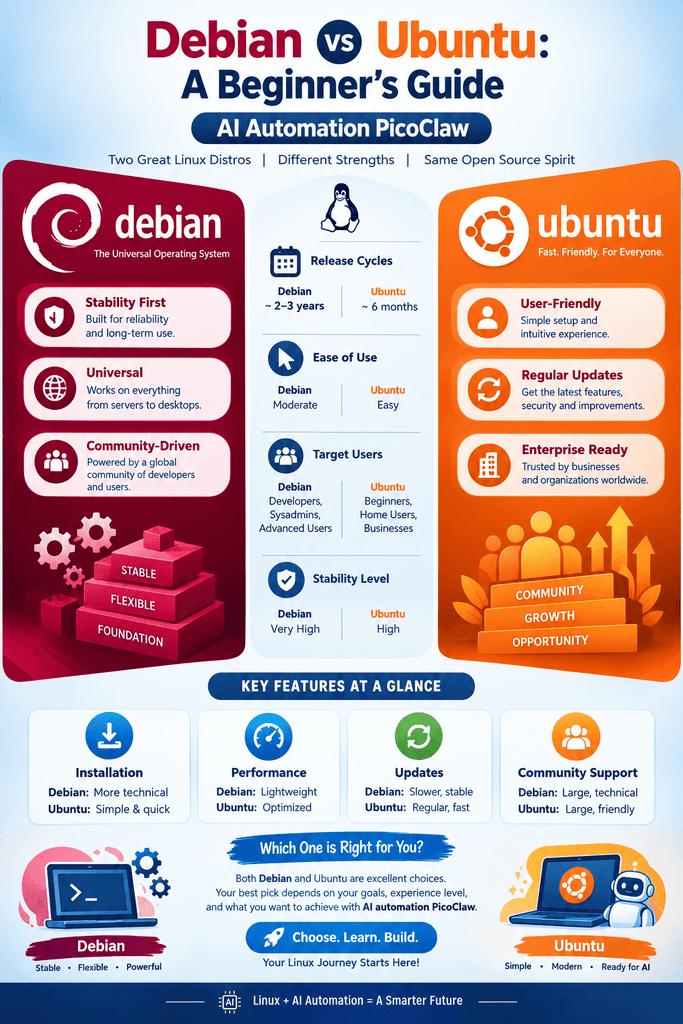
Debian vs Ubuntu: Direct Comparison
The following comparison summarizes the practical differences for a PicoClaw deployment.
| Factor | Debian | Ubuntu |
| PicoClaw compatibility | Excellent | Excellent |
| Lightweight server use | Excellent | Very good |
| Stability | Excellent | Excellent |
| Beginner friendliness | Good | Excellent |
| AI ecosystem | Very good | Excellent |
| Community tutorials | Excellent | Excellent |
| Minimal installations | Excellent | Very good |
| ARM support | Excellent | Excellent |
| RISC-V experimentation | Strong | Depends on specific release/support |
| GPU-oriented workloads | Good | Very good to excellent |
| Cloud availability | Excellent | Excellent |
| Docker support | Excellent | Excellent |
| Long-term server use | Excellent | Excellent |
| Small VPS deployment | Excellent | Excellent |
| Desktop development | Good | Excellent |
The table should not be interpreted as meaning that one distribution is universally superior.
Instead, it shows where each distribution tends to be most convenient.
Read More: Zapier Updates News: 5 Latest Features, Improvements, and What They Mean for Users
Which Is Better for Lightweight PicoClaw Automation?
If your main goal is to run PicoClaw on a machine with limited resources, Debian deserves serious consideration.
Imagine a small server with:
- 1 CPU core
- 512 MB or 1 GB of RAM
- Limited storage
- No GPU
- A stable internet connection
- A cloud AI API
PicoClaw can potentially operate effectively in such an environment because its resource requirements are very small. The official documentation specifically positions it for low-resource systems.
In this situation, the operating system should be simple and unobtrusive.
Debian’s minimal approach can be an advantage.
You can install only the services you need, configure PicoClaw, enable the necessary automation components, and keep the server running continuously.
For a dedicated ai automation picoclaw appliance, that simplicity is valuable.
Read More: What Are the Best AI Workflow Automation Tools? Top Solutions for Smarter Business Processes
Which Is Better for AI Development?
Ubuntu becomes more attractive when PicoClaw is only one component of a larger AI development environment.
Consider a workstation running:
- PicoClaw
- Python
- Jupyter
- Docker
- GPU drivers
- Local inference software
- Speech-to-text tools
- Computer-vision libraries
- Databases
- Web applications
- Development environments
This is no longer simply a PicoClaw server.
It is an AI development platform.
Ubuntu’s extensive AI ecosystem can make this type of configuration easier to manage.
Many developers also choose Ubuntu because they can find troubleshooting information quickly when a particular combination of hardware and software causes problems.
For this reason, Ubuntu is often the safer recommendation for newcomers building a broad AI stack.
Read More: 7 Essential and Effective Insights on How Google Determines Search Relevance
PicoClaw with Cloud AI APIs
One of the simplest ways to deploy ai automation picoclaw is to use cloud-based AI models.
In this architecture, PicoClaw runs locally but sends requests to an external AI provider.
The local machine therefore does not need to run a large language model itself.
This dramatically reduces hardware requirements.
A typical architecture may look like this:
User → Messaging Interface → PicoClaw → Cloud AI Model → PicoClaw → Automated Action
The automated action could involve:
- Processing a message
- Running a command
- Performing a scheduled task
- Searching for information
- Managing files
- Triggering another service
- Sending a response
- Executing an approved workflow
The exact capabilities depend on the PicoClaw configuration and enabled tools.
For this architecture, Debian and Ubuntu can both be excellent.
In fact, the difference may be so small that other factors should determine your decision.
If you already know Debian, use Debian.
If you already know Ubuntu, use Ubuntu.
Familiarity often matters more than small differences in operating-system overhead.
Read More: What Is SEO Rank Tracking? A Complete Guide to Measuring Search Performance
PicoClaw with Local AI Models
The decision becomes more complicated when you want local AI inference.
Running an AI model locally introduces additional requirements.
You may need:
- More RAM
- Faster storage
- A capable CPU
- GPU acceleration
- Specialized drivers
- Model runtimes
- Python libraries
- Containerized services
- Additional monitoring
At this point, Ubuntu often becomes the more convenient choice.
However, the right answer still depends on the hardware.
A small CPU-only device may not benefit from installing a large local model at all. A compact device might be better used as an automation controller that communicates with a remote AI service.
For example, PicoClaw can act as the lightweight control layer while a more powerful machine handles model inference.
This architecture separates automation from computation.
Read More: Do Google Reviews Help SEO? A Clear, Practical Guide to Rankings and Trust
Docker: Debian vs Ubuntu for PicoClaw
Docker is another important consideration.
The official PicoClaw repository provides Docker-based deployment options, including Docker Compose workflows.
Containers can make deployment easier because they separate applications from much of the host operating system.
A simplified architecture might look like this:
Linux Host
→ Docker
→ PicoClaw container
→ AI service container
→ Database container
→ Monitoring container
This approach can reduce concerns about conflicting package versions.
Both Debian and Ubuntu are suitable Docker hosts.
If your server is dedicated primarily to containers, Debian’s minimal nature can be appealing.
If you frequently follow third-party development tutorials, Ubuntu may offer more immediately familiar instructions.
Therefore, Docker does not create a decisive winner.
Read More: What Is Off-Page SEO? A Complete Guide to Building Authority and Trust
Security Considerations
Security is particularly important for AI agents because an automation system may interact with files, commands, APIs, messaging platforms, or other services.
PicoClaw’s official repository currently warns that the project is in early rapid development and that unresolved security issues may exist. It recommends caution with production deployment before version 1.0.
This is an important consideration regardless of whether you choose Debian or Ubuntu.
A secure ai automation picoclaw deployment should follow basic server-security principles.
These include:
Keep the Operating System Updated
Install security updates regularly.
An outdated server can expose unnecessary vulnerabilities.
Use Strong Authentication
Avoid weak passwords.
For remote administration, SSH keys are generally preferable to password-only access.
Minimize Exposed Services
Do not expose services to the public internet unless they need to be accessible.
Every unnecessary network service increases the attack surface.
Protect API Credentials
AI provider credentials should be treated as sensitive secrets.
Do not publish them in repositories or public configuration files.
The current PicoClaw project has also introduced security-related configuration changes, including separate handling of sensitive information in newer configurations.
Restrict Automation Permissions
An AI agent should have only the permissions required to perform its intended tasks.
Giving an automation agent unrestricted access to the entire server can increase the consequences of a configuration mistake or malicious input.
Which Distribution Is Better for Raspberry Pi?
Raspberry Pi is an especially interesting platform for PicoClaw.
The project supports ARM-based systems, and its documentation is specifically designed around low-resource and alternative hardware.
For a Raspberry Pi used as a dedicated automation device, both Debian-based Raspberry Pi environments and Ubuntu-based systems can work well.
The decision should depend on:
- RAM capacity
- Raspberry Pi model
- Other services
- Your Linux experience
- Required packages
- Storage configuration
- Whether you need local AI inference
- Whether the device will be dedicated to PicoClaw
If the Raspberry Pi is primarily a lightweight automation controller, a minimal Debian-family installation can be very efficient.
If it is part of a broader development environment, Ubuntu may be more convenient.
Which Is Better for a VPS?
For a cloud VPS, Debian is often an excellent choice.
A VPS running PicoClaw may have limited RAM and CPU resources. Since PicoClaw can operate with a very small footprint, a lightweight operating system can leave more resources available for supporting services.
A typical VPS deployment might include:
Debian/Ubuntu → PicoClaw → API provider → Messaging platform
If the server is dedicated to this task, Debian’s minimal configuration can be especially attractive.
However, Ubuntu is equally reasonable if your hosting provider offers a better-supported Ubuntu image or if you depend on Ubuntu-specific software.
Which Is Better for Beginners?
For beginners, Ubuntu generally has the advantage.
The reason is not that PicoClaw is more capable on Ubuntu.
It is that Ubuntu has a huge beginner-oriented ecosystem.
When a user encounters an error, they are likely to find:
- Tutorials
- Forum discussions
- Documentation
- Installation guides
- Video tutorials
- Troubleshooting articles
- Cloud-provider examples
written specifically for Ubuntu.
That can significantly shorten the learning curve.
Therefore, if you are new to Linux and want the easiest route into ai automation picoclaw, Ubuntu is a very sensible starting point.
Which Is Better for Advanced Linux Users?
Advanced Linux users may prefer Debian for a dedicated server because they can build a highly controlled environment.
A minimal installation can contain only the services that are required.
This makes it easier to understand exactly what is running on the machine.
For experienced administrators, Debian’s conservative approach can be a significant advantage.
At the same time, experienced AI developers may still prefer Ubuntu for GPU-heavy environments.
Therefore, experience alone does not determine the winner. The workload does.
Performance: Does PicoClaw Run Faster on Debian?
This is a common question.
In most practical deployments, you should not expect a dramatic PicoClaw performance advantage simply from switching between Debian and Ubuntu.
PicoClaw is a lightweight application, and the official project provides native binaries for supported architectures.
The larger performance factors are likely to include:
- CPU speed
- Available RAM
- Storage performance
- Network latency
- API response time
- Number of concurrent tasks
- External model performance
- Other services running on the machine
If PicoClaw is communicating with a remote AI model, network and API latency may be far more noticeable than a small difference in operating-system overhead.
This is why choosing an operating system solely because someone claims it is “faster for AI” can be misleading.
Reliability and Maintenance
A successful automation server should not merely work today.
It should continue working months later.
This makes maintenance an important consideration.
Debian’s conservative release philosophy can be attractive for long-running servers.
Ubuntu also provides strong long-term support options and extensive server documentation.
For either distribution, reliability depends heavily on how the machine is administered.
Good practices include:
- Keep reliable backups.
- Document configuration changes.
- Monitor disk usage.
- Monitor memory consumption.
- Keep security updates current.
- Test major changes before deploying them.
- Protect API credentials.
- Restrict unnecessary permissions.
- Monitor logs.
- Have a recovery procedure.
These practices matter more than choosing Debian or Ubuntu based on a small theoretical performance difference.
Debian vs Ubuntu: Best Choice by Use Case
The following recommendations make the choice easier.
Choose Debian if:
- You want a lightweight dedicated server.
- You are using a low-RAM VPS.
- PicoClaw is your primary application.
- You want minimal background services.
- You prefer conservative software updates.
- You are using ARM or experimental hardware.
- You are comfortable administering Linux.
- You want a simple automation appliance.
Choose Ubuntu if:
- You are new to Linux.
- You are building a broader AI environment.
- You expect to use GPU acceleration.
- You need extensive AI-development documentation.
- You are installing many third-party tools.
- You are following Ubuntu-based tutorials.
- You want a convenient general-purpose development machine.
- You expect PicoClaw to be only one part of a larger AI stack.
The Best Architecture for AI Automation PicoClaw
The most important lesson is that the operating system is only one layer of the system.
A practical architecture might look like this:
Layer 1: Hardware
CPU, RAM, storage, network, and optional GPU.
Layer 2: Operating System
Debian or Ubuntu.
Layer 3: Container or Application Runtime
Native binaries, Docker, or another deployment method.
Layer 4: PicoClaw
The AI agent and automation layer.
Layer 5: AI Provider
A remote model or a locally hosted model.
Layer 6: Automation Services
Cron jobs, APIs, databases, messaging systems, monitoring, and other tools.
This layered approach helps explain why there is no universal winner.
PicoClaw itself is deliberately portable. The surrounding infrastructure determines much of the practical operating-system choice.
A Practical Recommendation
For most users building a simple ai automation picoclaw server, I would recommend the following approach.
Choose Debian if you are creating a small, dedicated, always-on automation server and do not require a GPU-heavy local AI environment.
Choose Ubuntu if you want to experiment with a broader collection of AI tools, development frameworks, containers, GPU acceleration, and local inference.
If you are completely new to Linux, Ubuntu is probably the easier starting point.
If you are experienced with Linux administration and want a clean, minimal server, Debian is an excellent option.
Most importantly, do not assume that Ubuntu is automatically better because it is popular in AI development, or that Debian is automatically better because it uses fewer resources.
The correct choice depends on the complete workload.
Conclusion : Debian or Ubuntu for PicoClaw?
So, which is best for ai automation picoclaw?
There is no universal winner.
Debian wins for simplicity, minimalism, stability, lightweight deployments, and dedicated automation servers.
Ubuntu wins for convenience, broad AI-development support, beginner accessibility, and complex software stacks.
PicoClaw itself is highly portable. Its official documentation provides native Linux support across multiple architectures, and its repository includes precompiled binaries and Docker deployment options.
That means your decision should begin with the question:
What else will PicoClaw do on this machine?
If the answer is “mostly communicate with an AI API, automate tasks, and run continuously,” Debian is an excellent choice.
If the answer is “run AI development tools, containers, local models, GPU workloads, and several additional services,” Ubuntu may be the more convenient platform.
For a small home server, Raspberry Pi, RISC-V board, or low-cost VPS, Debian deserves strong consideration.
For an AI workstation or a more complicated development environment, Ubuntu is often the safer choice.
Ultimately, the best operating system for ai automation picoclaw is the one that matches your hardware, software stack, technical experience, and maintenance requirements.
The good news is that you are not locked into a major architectural decision simply because you choose one distribution. PicoClaw’s portable design means that the agent itself can run across a wide variety of Linux environments.
Start with the workload, choose the appropriate hardware, select the operating system that makes that workload easiest to maintain, and then build the automation stack around it.
Frequently Asked Questions (FAQ)
Is PicoClaw better on Debian or Ubuntu?
PicoClaw does not inherently require either Debian or Ubuntu. Because the project provides native binaries for supported Linux architectures, both can be excellent choices. The better option depends on the surrounding software stack and hardware.
Is Debian good for AI automation?
Yes. Debian is particularly suitable for lightweight, dedicated automation servers where stability, low overhead, and predictable maintenance are important.
Is Ubuntu better for AI workloads?
Ubuntu can be more convenient for complex AI workloads because of its large developer ecosystem, extensive documentation, and widespread use in AI and machine-learning environments. However, Debian is also capable of running many AI workloads.
Can PicoClaw run on a Raspberry Pi?
Yes. PicoClaw supports ARM-based platforms, and the official project provides ARM builds. Its low resource requirements make it particularly interesting for small single-board computers.
Can PicoClaw run without a GPU?
Yes. PicoClaw itself does not require a GPU. A GPU becomes relevant when additional software running alongside the agent requires hardware acceleration or when you want to perform local AI inference.
Is Docker available for PicoClaw?
Yes. The official PicoClaw repository provides Docker and Docker Compose deployment options.
Which is better for a low-RAM VPS?
Debian is often an excellent choice for a low-RAM VPS because a carefully configured minimal installation can keep system overhead low. However, Ubuntu can also work well if it better matches your software requirements.
Is Ubuntu easier for beginners?
Generally, yes. Ubuntu has a very large user community and an extensive collection of beginner-oriented tutorials and troubleshooting resources.
Is Debian more secure than Ubuntu?
Neither distribution should be considered automatically secure simply because of its name. Security depends on timely updates, configuration, access controls, exposed services, credentials, permissions, and the applications installed on the system.
Can PicoClaw use cloud AI models?
Yes. PicoClaw is designed to work with AI providers through its configuration and provider system. The official project documentation provides configuration examples and supports multiple AI-provider integrations.
Should I use Debian or Ubuntu for a dedicated PicoClaw server?
For a simple dedicated server, Debian is an excellent choice. For a broader AI development system with many additional tools, Ubuntu may be more convenient.
What is the most important factor when choosing between Debian and Ubuntu?
The most important factor is the complete workload. Consider your hardware, RAM, CPU, GPU requirements, AI model location, containers, automation tools, security needs, and your own Linux experience before selecting the operating system.