
How Does AI Automation Work in Customer Support? 9 Essential Steps, Benefits, Tools & Complete Guide
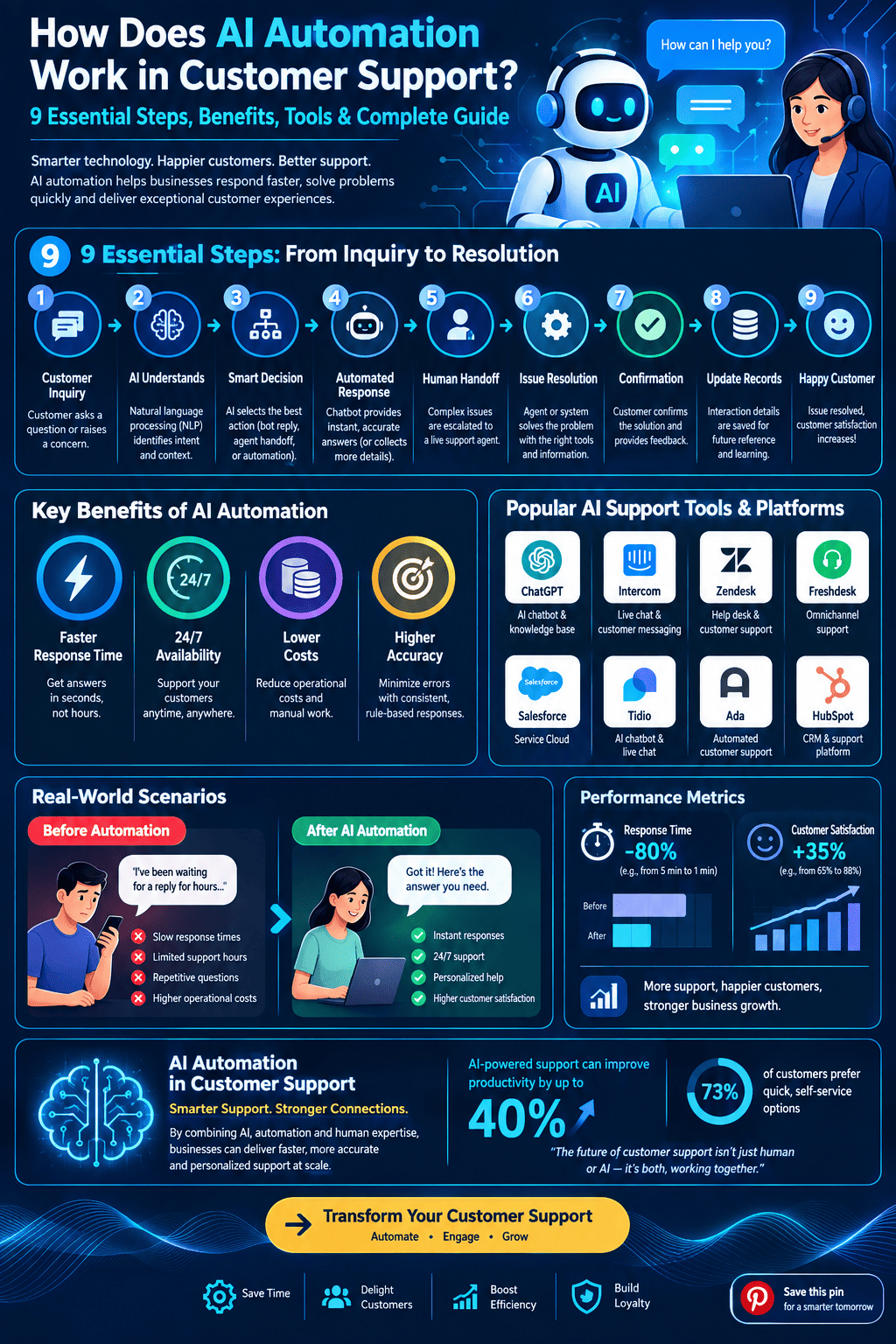
Customer support has changed significantly with the growth of artificial intelligence (AI). Businesses that once relied entirely on human agents can now use AI-powered systems to answer common questions, organize customer requests, identify intent, retrieve information, and route complex issues to the appropriate employee.
Understanding ai automation work in customer support requires looking beyond chatbots. Modern customer-support automation combines natural language processing, machine learning, large language models, workflow automation, knowledge bases, customer relationship management (CRM) systems, and human-agent collaboration. These technologies can work together to make support operations faster and more consistent while allowing human representatives to concentrate on conversations that require judgment, empathy, or specialized knowledge.
This guide explains how AI automation works in customer support, the technologies behind it, common applications, benefits, limitations, implementation steps, and future developments.
Read More: Best GTM Digital Agents in AI Sales Automation: 9 Leading Tools and a Complete Guide
What Is AI Automation in Customer Support?
AI automation in customer support refers to using artificial intelligence to perform or assist with repetitive support activities that would otherwise require human intervention.
These activities can include:
- Answering frequently asked questions
- Understanding customer messages
- Classifying support tickets
- Detecting customer intent
- Retrieving information from a knowledge base
- Suggesting responses to agents
- Routing conversations to the correct department
- Summarizing customer interactions
- Analyzing customer sentiment
- Automating routine workflows
- Providing support outside normal business hours
Unlike traditional rule-based automation, AI-based systems can interpret natural language and respond according to the context of a conversation.
For example, a traditional automation system might recognize only the exact phrase “reset password.” An AI system may understand several variations, such as “I forgot my login password,” “I cannot access my account,” or “How can I change my password?”
The central question of ai automation work in customer support can therefore be answered through a simple idea: AI receives customer information, interprets it, determines an appropriate action, and either completes the task automatically or assists a human agent.
Read More:What Is AI Automation Software? 9 Essential Facts, Benefits, Types & Applications
How Does AI Automation Work in Customer Support?
The process generally involves several connected stages. Although the exact architecture differs between companies, the following nine steps explain the typical workflow.
1. AI Receives the Customer Request
The process begins when a customer contacts a company.
Customers may communicate through:
- Website chat
- Mobile applications
- Social media
- Messaging platforms
- Voice calls
- Help-desk portals
The AI system first receives the customer’s message or transcribed speech.
For example, a customer might write:
“My order was supposed to arrive yesterday, but I still haven’t received it.”
The system does not simply look for individual words. Modern AI can analyze the complete sentence and identify the likely purpose of the request.
The customer’s message may be classified as an order-delivery issue, which allows the automation system to determine what information and workflow should be used next.
2. Natural Language Processing Understands the Message
Natural language processing (NLP) enables computers to process human language.
Customer messages are often informal, incomplete, or ambiguous. NLP helps AI interpret language despite these variations.
For example:
- “Where is my package?”
- “Can you check my delivery?”
- “My order hasn’t arrived.”
- “Why is shipping taking so long?”
Although these sentences are different, they may communicate the same basic intent.
AI can analyze factors such as:
- Words
- Sentence structure
- Context
- Intent
- Entities
- Conversation history
Entities are specific pieces of information within a message, such as an order number, product name, account number, or date.
Suppose a customer says, “Where is order #45821?” The system may identify “45821” as the order identifier and use it to retrieve information from the company’s order-management system.
Read More: What Is AI Automation? A Complete Guide to How It Works, Benefits, Types, and Applications
3. AI Identifies Customer Intent
Intent detection is one of the most important components of customer-support automation.
The system attempts to determine what the customer wants to accomplish.
Common intents include:
- Product information
- Password reset
- Refund request
- Order tracking
- Billing question
- Subscription cancellation
- Technical problem
- Account update
- Complaint
- Sales inquiry
Once intent has been identified, the system can select an appropriate response or workflow.
For example, if the customer asks, “How do I change my billing address?” the AI may classify the request as an account-information update.
It can then provide instructions or initiate a predefined workflow.
Intent detection makes ai automation work in customer support more flexible because customers do not need to use a specific command or phrase.
Read More: Zapier Updates News: 5 Latest Features, Improvements, and What They Mean for Users
4. AI Retrieves Relevant Information
After understanding the request, AI may need information before responding.
Customer-support systems can connect AI to sources such as:
- Knowledge bases
- Frequently asked questions
- Product documentation
- Order databases
- CRM platforms
- Account systems
- Shipping systems
- Internal policies
For example, imagine a customer asks whether a particular product is covered by a warranty.
The AI can retrieve the relevant warranty information from the company’s approved knowledge source and use it to formulate an answer.
More advanced systems can use retrieval-augmented generation (RAG). In a RAG workflow, the AI retrieves relevant information from a knowledge source before generating a response.
This approach can help reduce unsupported answers because the model has relevant company information available during the interaction.
Read More: What Are the Best AI Workflow Automation Tools? Top Solutions for Smarter Business Processes
5. AI Generates or Selects a Response
Once the system understands the request and retrieves relevant information, it can produce an answer.
There are two common approaches.
Rule-based response selection uses predefined answers for specific situations.
Generative AI creates responses dynamically based on the customer’s message, conversation context, and available information.
For example, a customer might ask:
“I received the wrong size. What should I do?”
The system can recognize the issue, retrieve the company’s return policy, and explain the available options.
A well-designed system should also follow business rules. It should not promise a refund, replacement, discount, or delivery date unless the connected systems confirm that the action is permitted.
This distinction is important because effective automation is not simply about generating natural-sounding text. It must also produce accurate and policy-compliant responses.
Read More: 7 Essential and Effective Insights on How Google Determines Search Relevance
6. AI Performs Routine Actions
Some customer-support systems can do more than provide information.
They can perform specific actions through integrations with business software.
For example, AI may be able to:
- Create a support ticket
- Update customer information
- Check an order
- Initiate an approved refund
- Change a subscription
- Send a confirmation email
- Schedule an appointment
- Escalate an issue
- Update ticket status
Consider a customer who wants to cancel a subscription.
The AI can verify the customer’s account, determine whether cancellation is allowed, explain any applicable terms, and initiate the cancellation through the company’s subscription system.
This is where AI automation becomes workflow automation rather than simple conversational assistance.
The AI acts as an interface between the customer and the company’s software systems.
Read More: What Is SEO Rank Tracking? A Complete Guide to Measuring Search Performance
7. AI Determines When Human Help Is Necessary
Automation should not mean that every customer conversation is handled entirely by a machine.
A strong customer-support system knows when to involve a human agent.
Escalation may occur when:
- The customer has a complicated problem
- The AI cannot determine the intent
- The requested action requires authorization
- The customer disputes a decision
- The issue involves sensitive information
- The customer explicitly requests a human
- The system lacks sufficient information
- The conversation becomes highly complex
For example, a simple “How can I reset my password?” question may be handled automatically.
However, a complicated billing dispute involving multiple transactions may require a human representative.
In this situation, AI can transfer the conversation while providing the agent with a summary of what has already happened.
This prevents customers from repeatedly explaining the same issue.
Read More: Do Google Reviews Help SEO? A Clear, Practical Guide to Rankings and Trust
8. AI Assists Human Support Agents
AI automation is not limited to customer-facing chatbots.
It can also work behind the scenes to improve agent productivity.
An AI assistant can:
- Summarize conversations
- Suggest responses
- Search documentation
- Identify relevant policies
- Recommend troubleshooting steps
- Translate messages
- Detect sentiment
- Extract important information
- Generate follow-up emails
For example, an agent receiving a complicated technical-support ticket may need to search through several pages of documentation.
An AI assistant can identify the relevant information and present a concise summary.
The agent can then review the recommendation and decide how to respond.
This human-in-the-loop approach can combine automated processing with human judgment.
Read More: What Is Off-Page SEO? A Complete Guide to Building Authority and Trust
9. AI Learns From Support Data and Performance Feedback
The final stage involves analyzing support interactions and performance.
Organizations can examine:
- Frequently asked questions
- Resolution rates
- Escalation rates
- Response times
- Customer satisfaction
- Common complaints
- Failed automation attempts
- Frequently used support articles
This information can reveal areas where automation needs improvement.
For example, if many customers ask about a particular product feature and the AI frequently escalates those questions, the company may need to improve its documentation or update the AI workflow.
Modern AI systems may also be improved through better prompts, updated knowledge sources, evaluation datasets, workflow rules, and model configurations.
The goal is not simply to automate more conversations. The goal is to automate appropriate tasks accurately while maintaining a reliable customer experience.
Read More: What Is Local SEO? A Complete Guide to Boosting Your Local Visibility
Key Technologies Behind AI Customer Support
Several technologies contribute to modern customer-support automation.
Natural Language Processing
NLP helps systems understand written and spoken human language.
It supports tasks such as intent recognition, entity extraction, classification, translation, and text analysis.
Machine Learning
Machine learning allows systems to identify patterns in data and make predictions or classifications.
For example, a support platform can use machine-learning models to categorize tickets according to their likely topic or priority.
Large Language Models
Large language models can understand and generate natural-language responses.
They are particularly useful for conversational applications because they can process context and produce flexible responses.
However, they still require appropriate controls, reliable information sources, and evaluation.
Retrieval-Augmented Generation
RAG combines language generation with information retrieval.
Instead of relying only on information encoded in a model, the system can retrieve relevant documents or records from an external knowledge source.
This can be useful for companies with frequently changing product information or internal policies.
Workflow Automation
Workflow automation connects AI decisions to business processes.
For example:
Customer message → Intent detection → Account verification → Order lookup → Response → Ticket update
This allows AI to participate in multi-step support operations.
CRM and Help-Desk Integrations
Integrations allow AI systems to access relevant customer and support information.
A CRM may contain customer history, while a help-desk system may contain previous tickets and conversation records.
Combining these systems can give AI greater context.
What Are the Main Uses of AI in Customer Support?
AI can support many areas of customer service.
Automated FAQs
AI can answer repetitive questions about:
- Pricing
- Product features
- Shipping
- Returns
- Account settings
- Business hours
- Availability
This reduces the number of simple questions requiring manual responses.
Ticket Classification
AI can categorize incoming tickets based on subject and intent.
For example:
| Customer Issue | AI Category |
| “My payment failed” | Billing |
| “The application crashes” | Technical Support |
| “Where is my package?” | Shipping |
| “I want to return this” | Returns |
| “Can I upgrade?” | Sales |
Correct classification can help route tickets efficiently.
Customer Sentiment Analysis
AI can analyze language for indicators of customer sentiment.
Support teams may use this information to identify conversations that require additional attention.
However, sentiment models are not perfect. Sarcasm, cultural differences, short messages, and ambiguous language can make interpretation difficult.
Multilingual Support
AI translation can help companies communicate with customers who speak different languages.
A customer can submit a question in one language while the support team receives an automatically translated version.
This can expand support coverage without requiring every agent to speak every language.
Conversation Summarization
Long conversations can be summarized automatically.
A summary might include:
- Customer’s main problem
- Previous troubleshooting steps
- Actions already taken
- Current status
- Recommended next step
This can save agents time when taking over an existing conversation.
Benefits of AI Automation in Customer Support
When implemented appropriately, AI automation can provide several operational benefits.
Faster Responses
Automated systems can respond immediately to routine questions.
Customers do not necessarily need to wait for a support representative to become available.
24/7 Availability
AI systems can operate outside traditional business hours.
This is particularly useful for companies serving customers across multiple time zones.
Reduced Repetitive Work
Support representatives often spend considerable time answering similar questions.
Automation can handle many repetitive requests, allowing employees to focus on more complicated cases.
More Consistent Responses
AI systems can use approved knowledge sources and standardized workflows.
This can help reduce variation in responses to routine questions.
Improved Agent Productivity
AI assistants can reduce administrative work by summarizing conversations, finding information, and preparing draft responses.
Scalability
A company may experience sudden increases in support volume during product launches, seasonal promotions, or service disruptions.
Automated systems can handle a large number of routine interactions simultaneously, although capacity and infrastructure still need to be planned carefully.
Limitations and Challenges
AI automation also introduces important challenges.
Incorrect Information
Generative AI can sometimes produce inaccurate information.
This is especially risky in customer support because incorrect answers can cause financial, operational, or reputational problems.
Businesses should therefore connect AI to reliable information sources and implement appropriate safeguards.
Privacy and Security
Customer-support conversations may contain personal information.
Organizations need appropriate controls for:
- Access
- Data storage
- Authentication
- Encryption
- Retention
- Third-party integrations
AI systems should only access information necessary for the task.
Lack of Human Empathy
AI can produce polite and natural language, but certain customer situations require human understanding and judgment.
Customers dealing with serious complaints or complicated circumstances may benefit from human assistance.
Integration Complexity
Connecting AI to CRM, billing, order-management, authentication, and ticketing systems can require substantial technical work.
Poorly designed integrations can create errors or expose incorrect information.
Over-Automation
Automating every possible interaction can make customer support frustrating.
Customers may become dissatisfied if they cannot reach a human when they have a legitimate reason to do so.
Effective automation therefore includes clear escalation paths.
AI Automation vs. Traditional Customer Support
Traditional customer support typically depends heavily on human agents.
A customer submits a request, a representative reviews it, searches for relevant information, prepares a response, and performs any required actions.
AI-assisted support can automate some of these steps.
| Activity | Traditional Approach | AI-Assisted Approach |
| FAQ response | Agent answers | AI may answer automatically |
| Ticket classification | Agent categorizes | AI classifies |
| Information search | Agent searches | AI retrieves relevant information |
| Conversation summary | Agent writes summary | AI generates summary |
| Complex complaint | Human agent | Human agent with AI assistance |
| Routine workflow | Agent performs steps | AI may initiate approved actions |
The objective is not necessarily to replace human support. Instead, businesses can divide work between automated systems and human employees according to complexity and risk.
How to Implement AI Automation in Customer Support
Businesses should approach implementation systematically.
Step 1: Identify Repetitive Support Tasks
Start by examining existing support tickets.
Look for questions that:
- Occur frequently
- Have predictable answers
- Require limited judgment
- Follow clear procedures
These are often suitable for initial automation.
Step 2: Organize the Knowledge Base
AI works better when it has access to accurate and well-structured information.
Review:
- FAQs
- Product documentation
- Policies
- Troubleshooting guides
- Return procedures
- Internal support documents
Remove outdated or contradictory information.
Step 3: Select Appropriate AI Technology
The required technology depends on the use case.
A simple FAQ system may require less sophisticated AI than a system that performs account actions or handles technical troubleshooting.
Consider:
- NLP capabilities
- Generative AI support
- RAG
- Workflow automation
- CRM integrations
- Security features
- Analytics
- Human escalation
Step 4: Establish Business Rules
Define what the AI can and cannot do.
For example:
AI can: provide shipping information.
AI can: create a standard support ticket.
AI can: suggest troubleshooting instructions.
AI cannot: approve an unusual refund without authorization.
Clear boundaries reduce operational risks.
Step 5: Create Human Escalation Paths
Every automated support system should have a process for transferring difficult cases to humans.
The transfer should preserve relevant context whenever possible.
Step 6: Test Before Full Deployment
Test the system using realistic customer questions.
Include:
- Simple requests
- Misspellings
- Ambiguous questions
- Multiple questions
- Unusual requests
- Incorrect assumptions
- Adversarial inputs
Evaluate both accuracy and customer experience.
Step 7: Monitor Performance
Track metrics such as:
- First-response time
- Resolution time
- Automation rate
- Escalation rate
- Customer satisfaction
- Accuracy
- Repeated-contact rate
Monitoring helps identify problems that may not appear during initial testing.
Best Practices for AI Customer Support
Several practices can improve reliability.
Keep the Knowledge Base Updated
Outdated information can lead to incorrect answers.
Use Human Oversight
Humans should remain involved in high-risk or complex decisions.
Protect Customer Data
Use appropriate security and access controls.
Make Escalation Easy
Customers should not have to repeatedly fight an automated system to reach a person.
Test Realistic Scenarios
Testing should reflect actual customer behavior rather than only perfectly written questions.
Measure Outcomes
A high automation rate does not automatically mean better support. Businesses should also measure accuracy, satisfaction, resolution quality, and customer effort.
The Future of AI Automation in Customer Support
Customer-support AI is likely to become increasingly integrated with business systems.
Future systems may combine conversational AI with more sophisticated workflow automation.
For example, a customer could say:
“My order arrived damaged. Please arrange a replacement.”
A highly integrated system could identify the order, verify eligibility, collect required information, create the replacement request, update the support ticket, and provide confirmation.
Human agents could then focus on exceptions and cases requiring judgment.
Another important development is the growth of AI agents capable of completing multi-step tasks. Rather than simply answering questions, these systems can plan actions, interact with software tools, and monitor the progress of a workflow.
However, greater autonomy also increases the importance of security, permissions, monitoring, testing, and human oversight.
Frequently Asked Questions (FAQ)
1. How does AI automation work in customer support?
AI automation work in customer support involves using artificial intelligence to understand customer requests, identify intent, retrieve information, generate responses, perform approved actions, and escalate complex cases to human agents.
2. Can AI completely replace customer support agents?
AI can automate many repetitive support tasks, but human representatives remain important for complex, sensitive, unusual, or emotionally demanding situations. Many organizations therefore use AI as an assistant rather than relying exclusively on automation.
3. What is the difference between a chatbot and AI customer support?
A traditional chatbot may rely heavily on predefined rules and responses. AI customer-support systems can use NLP, machine learning, generative AI, knowledge retrieval, and business-system integrations to handle more flexible conversations and workflows.
4. Can AI access customer account information?
It can when it is properly integrated with authorized business systems. Access should be controlled through authentication, permissions, security policies, and appropriate data-protection measures.
5. Is AI customer support available 24/7?
AI systems can operate continuously, which allows businesses to provide automated assistance outside normal working hours. Human-agent availability may still depend on the organization’s support schedule.
6. Can AI handle complaints?
AI can handle straightforward complaints and collect relevant information, but complex or sensitive complaints may require human intervention. Effective systems should provide a clear escalation path.
7. What information does AI need to answer customers?
Depending on the task, AI may need access to product documentation, FAQs, policies, customer-account information, order data, support history, or other approved knowledge sources.
8. How can businesses measure AI customer-support performance?
Common metrics include response time, resolution rate, escalation rate, customer satisfaction, accuracy, repeat-contact rate, and automation rate. These metrics should be evaluated together rather than relying on a single measurement.
9. What is the biggest advantage of AI automation in customer support?
One major advantage is the ability to automate repetitive tasks while allowing human representatives to concentrate on more complicated customer needs. The actual benefit depends on implementation quality, data accuracy, integration, and appropriate human oversight.
Conclusion
Understanding ai automation work in customer support means looking at an entire technology ecosystem rather than a single chatbot. AI can receive customer requests, understand language, identify intent, retrieve relevant information, generate responses, execute approved workflows, and support human representatives.
The most effective systems balance automation with human involvement. Simple and repetitive questions can often be handled automatically, while complicated or sensitive situations can be transferred to trained support professionals.
As AI technology continues to develop, customer-support automation is likely to become more capable of completing multi-step tasks and working directly with business systems. At the same time, accuracy, privacy, security, transparency, and human oversight will remain essential.
For businesses, the goal should not simply be to automate the largest possible number of conversations. A better approach is to identify appropriate tasks, provide AI with reliable information, establish clear boundaries, monitor performance, and ensure that customers can receive human assistance when necessary. This balanced approach can make AI a practical part of a modern customer-support operation without losing the human element that remains important in customer service.