
How to Use Google Trends for SEO
Google Trends is one of the most powerful free tools in SEO. When used correctly, it helps you spot rising topics, validate keyword demand, time your content perfectly, and outperform competitors who rely only on traditional keyword tools.
Let’s start, how to use Google Trends for SEO step by step—with real examples, practical workflows, and insights that go beyond surface-level tips.
What Is Google Trends (and Why SEOs Should Care)?
Google Trends shows how often a term is searched relative to all searches over time. Instead of absolute search volume, it reveals:
- Interest trends (rising, falling, seasonal)
- Geographic demand
- Related topics and queries
- Comparisons between keywords
For SEO, this means you can:
- Avoid declining keywords
- Discover topics before competitors
- Align content with seasonal and regional demand
- Validate keyword ideas from other tools
In short, learning how to use Google Trends for SEO helps you make smarter, data-driven content decisions.
Google Trends Data Correctly (Critical for SEO)
Before using Google Trends for SEO, you must understand what the numbers mean.
Key Things to Know
- Scores range from 0 to 100, not search volume
- “100” = peak popularity for that term
- Data is relative, not absolute
- A score of 50 means half the popularity of the peak
SEO Insight
A keyword with lower volume but rising trend often outperforms a high-volume keyword that’s declining.
Expert tip: Always cross-check Google Trends data with tools like Google Keyword Planner, Ahrefs, or SEMrush for volume context.
Use Google Trends to Validate Keyword Ideas
Most SEOs start with keyword tools. Smart SEOs validate with Google Trends.
How to Do It
- Enter your keyword into Google Trends
- Set:
- Location (global or target country)
- Time range (12 months, 5 years, or custom)
- Search type (Web, YouTube, News, Shopping)
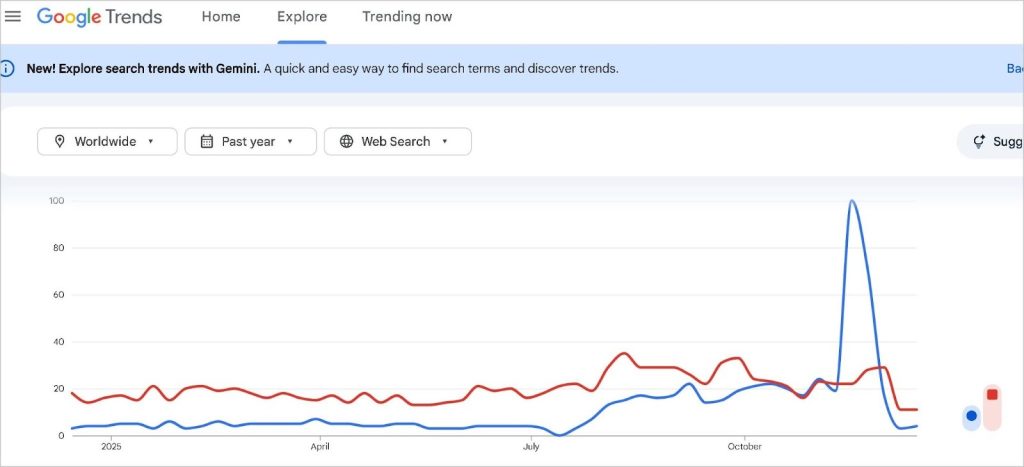
- Analyze the trend line
What to Look For
- Upward trend → Green light for content
- Flat trend → Evergreen potential
- Downward trend → Risky long-term investment
Example
You’re deciding between:
- “AI content writer”
- “article spinner”
Google Trends clearly shows “AI content writer” rising while “article spinner” is declining—an easy SEO decision.
This is a core technique in how to use Google Trends for SEO effectively.
Find Rising Topics Before They Go Mainstream
This is where Google Trends truly shines.
How to Discover Emerging SEO Opportunities
- Search a broad topic (e.g., “SEO tools”)
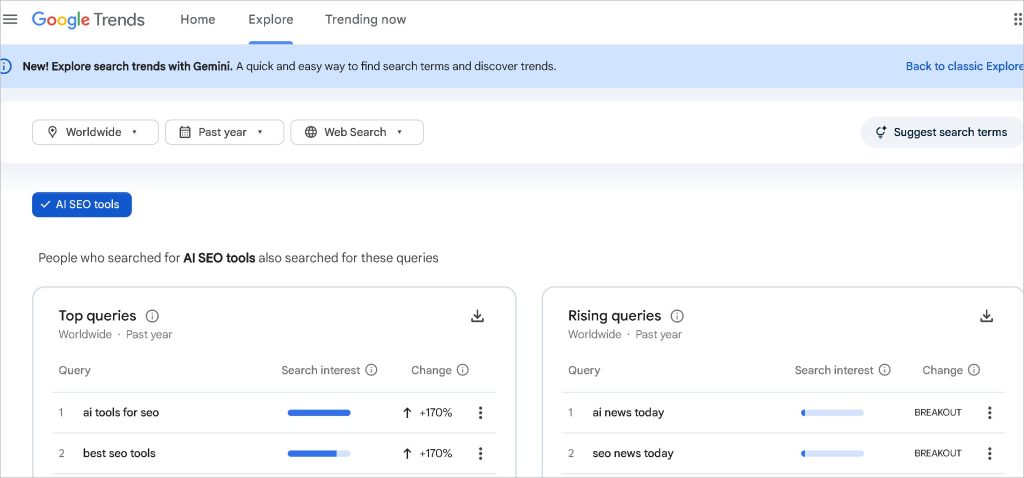
- Scroll to Related Queries
- Switch from Top to Rising
What “Rising” Means
- Queries gaining popularity rapidly
- Often low competition
- High future traffic potential
SEO Strategy
Create content targeting:
- “Breakout” queries
- Rapidly rising long-tail keywords
Real-World Example
Before “AI SEO tools” became competitive, Google Trends showed it as a breakout query. Early publishers dominated rankings.
If you want traffic growth, mastering how to use Google Trends for SEO for trend discovery is non-negotiable.
Compare Keywords to Choose the Best One
Google Trends allows direct keyword comparisons—something many SEO tools overlook.
How to Compare Keywords
- Enter your main keyword
- Click “+ Compare”
- Add alternative keywords
What to Compare
- Similar intent keywords
- Singular vs plural
- Branded vs non-branded
- Old vs new terminology
Example
Compare:
- “how to use google trends”
- “google trends seo”
You might discover one consistently outperforms the other—helping you choose better titles, URLs, and headings.
This comparison feature is central to how to use Google Trends for SEO like a professional.
Read: How Quickly Does SEO Work
Identify Seasonal Keywords and Time Your Content
Some keywords peak at specific times of the year. Google Trends exposes this clearly.
Common Seasonal Niches
- Fitness (January)
- Travel (summer & holidays)
- E-commerce (Black Friday, Eid, Christmas)
- Education (admission seasons)
How SEOs Use This
- Publish content 2–3 months before peak
- Update old content before the season returns
- Avoid publishing seasonal content after the peak
Example
“Weight loss tips” spikes every January. Publishing in December gives Google time to rank your page.
Seasonal planning is a major advantage when learning how to use Google Trends for SEO strategically.
Use Google Trends for Local & International SEO
Google Trends allows geo-specific analysis—perfect for local and global SEO.
How to Use Location Data
- Set your target country or region
- Scroll to Interest by subregion
- Identify high-demand locations
SEO Applications
- Create location-specific landing pages
- Customize content language and examples
- Prioritize markets with higher demand
Example
A keyword might perform better in:
- India than the US
- Bangladesh than globally
- Urban areas vs rural regions
For local SEO, understanding how to use Google Trends for SEO at the regional level gives you a competitive edge.
Optimize Content Type Using Search Categories
Google Trends lets you filter by category and search type.
Search Types You Can Analyze
- Web Search (blog & website SEO)
- YouTube Search (video SEO)
- Image Search
- Shopping Search
- News Search
Why This Matters
Some keywords perform better on YouTube than Google Search.
Example
“Product review” keywords often trend higher in YouTube search—suggesting video content might outperform blog posts.
Advanced SEOs use this insight when deciding how to use Google Trends for SEO across multiple platforms.
Read: How to Create a Collection Report from Google Analytics
Refresh Old Content Using Trend Data
Google Trends isn’t just for new content—it’s powerful for content updates.
How to Refresh Content
- Enter your main topic
- Check related queries (Top + Rising)
- Add missing subtopics to existing articles
- Update titles and headings based on current interest
SEO Benefit
- Improved freshness signals
- Better keyword coverage
- Higher rankings without new URLs
This technique is often ignored but essential when mastering how to use Google Trends for SEO long-term.
Avoid SEO Mistakes Using Google Trends
Google Trends also helps you avoid bad SEO decisions.
Common Mistakes It Prevents
- Targeting dying keywords
- Chasing outdated terminology
- Writing content too late
- Ignoring regional demand
Example
If interest in a keyword has dropped steadily for 5 years, no amount of optimization will revive it.
Knowing how to use Google Trends for SEO protects your time, budget, and rankings.
Combine Google Trends with Other SEO Tools (Best Practice)
Google Trends works best when combined with traditional SEO tools.
Recommended Workflow
- Find keyword ideas (Ahrefs / SEMrush / GKP)
- Validate trends (Google Trends)
- Analyze intent & competition
- Create content aligned with rising demand
Why This Works
- Keyword tools show volume
- Google Trends shows direction
Professional SEOs never rely on just one data source—and neither should you.
Why Google Trends Is a Must-Have SEO Tool
Google Trends doesn’t replace keyword research tools—it enhances them. When you truly understand how to use Google Trends for SEO, you gain:
- Future-focused keyword insights
- Smarter content timing
- Better regional targeting
- Stronger competitive advantage
Most competitors use Google Trends casually. You now know how to use it strategically, systematically, and profitably.
If you apply the steps in this guide consistently, Google Trends will become one of the most valuable tools in your SEO toolkit.